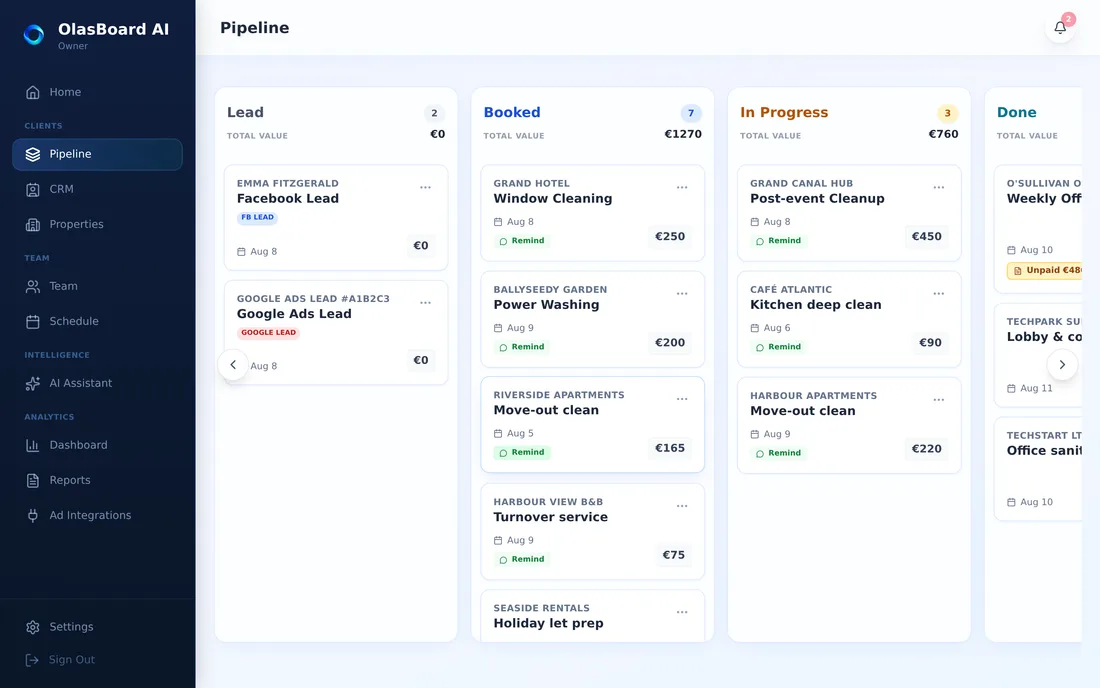
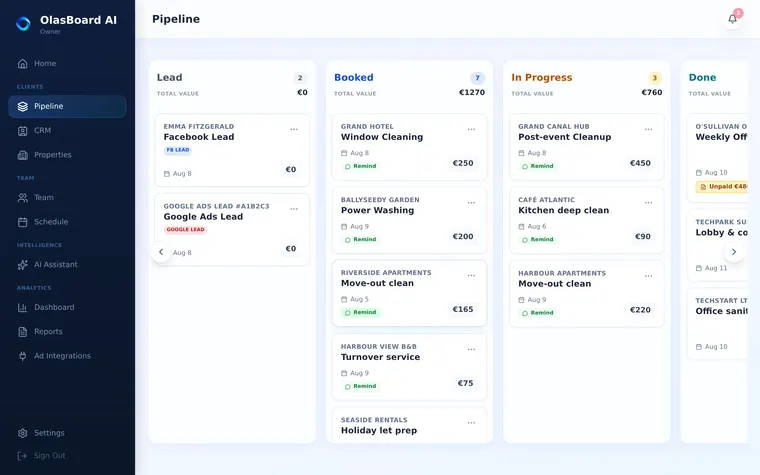
Visual job pipeline
Lead → Booked → In Progress → Done → Paid. Drag a job across, and everything downstream follows.
Quotes out in a minute, jobs on a board, invoices chased for you, and expenses receipted and categorised ready for your VAT return - from a phone on site, not a laptop at midnight.
No card required · Cancel in one click
One owner, their own crew, their own clients. Not a badge from a review site.
“WEPRO works across all of Ireland. I can see where the business is going, how the people work, and how the manager works. I can create the tasks, and it suits an owner who wants to grow. The AI writes the emails to clients and checks them before I send them, and the work goes into the pipeline. Supplies are receipted and filed with the costs, so that side stops eating the week. It saves time and, most of all, money. This year the business has grown four times.”
Nicholas Denezh, Owner
WEPRO Cleaning Services · Ireland
A quoting app stops at the estimate. A dispatch suite assumes someone in an office is assigning the day. This follows the whole job, for the person who answered the enquiry and may also be the one doing the work.
From a call, a WhatsApp, a form or an ad. It lands in the pipeline as a lead instead of in your head.
Line items, your terms, your logo. Out as a PDF by email or WhatsApp in under a minute, from the van.
On the calendar, with the client, the address and the price. Clashes and travel gaps get flagged before you agree to them.
Claim it, start the timer, photograph before and after, finish. Hours and pay are worked out the same way whoever pressed the button.
Invoice from the job in one step, with a pay link the client can pay by card. Part payments tracked, and the app chases what is late so you do not have to.
Costs and expenses sit against the job, so profit is per job and per client - not a number you find out in March.
Everything else follows from that. If you cannot see it, you cannot price it, chase it, or tell who is carrying the work.
Most tools tell you what somebody typed into them. These figures come off the work itself: the moment a job was taken, the moment it was started, the moment it was finished, the hours that fall out of that, and the photos attached while the person was standing there.
Nobody writes their own report card. That is the difference between a dashboard you believe and one you argue with.
Per-person performance reporting is on the Business plan. Job records, timings and photo proof are on every plan.
For anyone running a crew
The job goes to the whole crew at once and the first person free takes it. No calls, no group chat you have to keep track of afterwards.
Client, address, time, price. Thirty seconds, from the van.
One offer to everyone instead of five messages sent one at a time. Their phone buzzes.
Exactly one person gets it, however many tap at once - and nobody can take a job on top of one they already have.
It shows who took it. If nobody does, you hear about it in hours, not on the day.
Most tools in this category price per user, and “user” means anyone with a login - your crew, your subcontractors, the person in the office. The bill grows every time you hire.
Here the seats come with the plan. €99 a month covers up to 20 people, and the price is the same whether 20 of them are working today or two.
The same app underneath. A cleaning round, a roof leak and a maintenance contract are not the same job. 28 trades, each with its own page — cleaning, plumbing, HVAC, roofing, electrical, landscaping and the other field trades where you run the clients and the crew. Find yours.
Recurring rounds where before-and-after is the whole sale.
Someone is waiting. The job has to reach whoever is free, now.
Seasonal work, contracts, and jobs attached to a building.
Not listed? It still fits if the work arrives as a job with a client, a price and a date - that is the whole test.
Not a job tracker with invoicing bolted on. The pipeline, the money, the crew and the advice are one system.
Money in motion
Every opportunity on one board, from first contact to cash collected. Leads arrive by hand, from your ad platforms, or from an accepted quote - nothing sits in a message thread.
Made, spent, owed
Quotes become invoices, invoices take part payments and carry a pay link for card, Apple Pay or Google Pay, expenses carry receipts. One definition of unpaid, so no two screens disagree about the same month.
The hands that do the work
Owner, manager and worker roles. Workers get a phone-first view of their own jobs with claim, timer and photo proof, and need no training to use it.
Over your own numbers
Ask who owes you, what a job made, or which leads have gone quiet. It can also book the job, write the quote or invoice, and file a receipt — and it stops for your tap before anything is written. It drafts the message to a client; you send it.
Stop paying for five tools that do not talk to each other.
Lead → Booked → In Progress → Done → Paid. Drag a job across, and everything downstream follows.
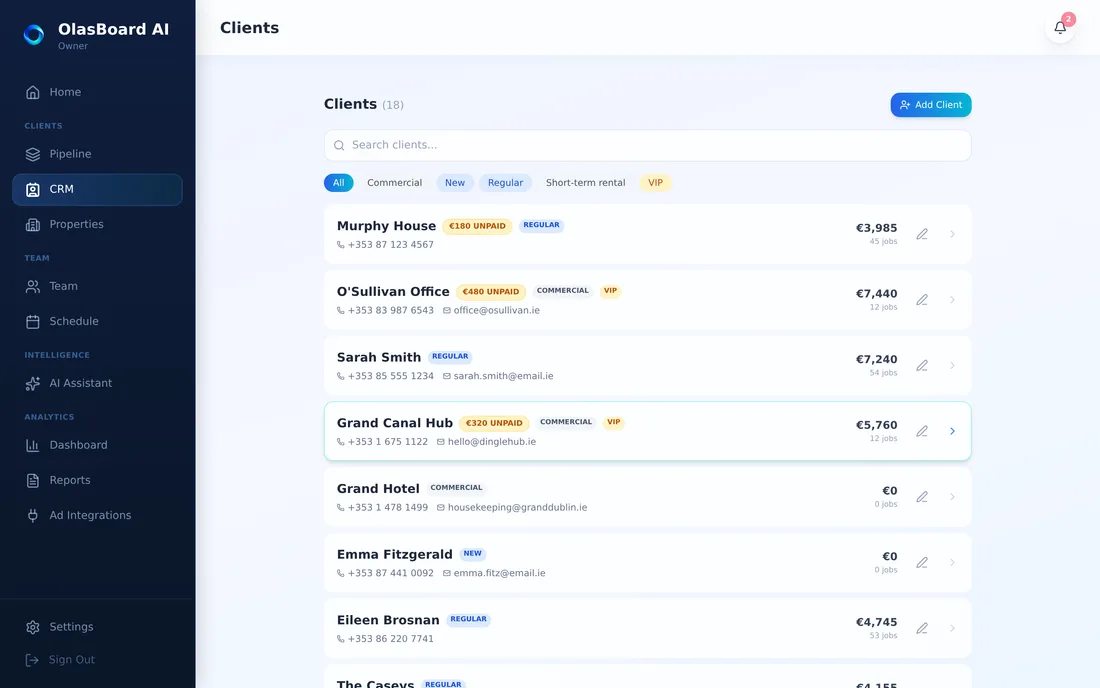
Every job, quote and invoice against the client, with what they still owe you on the same screen.
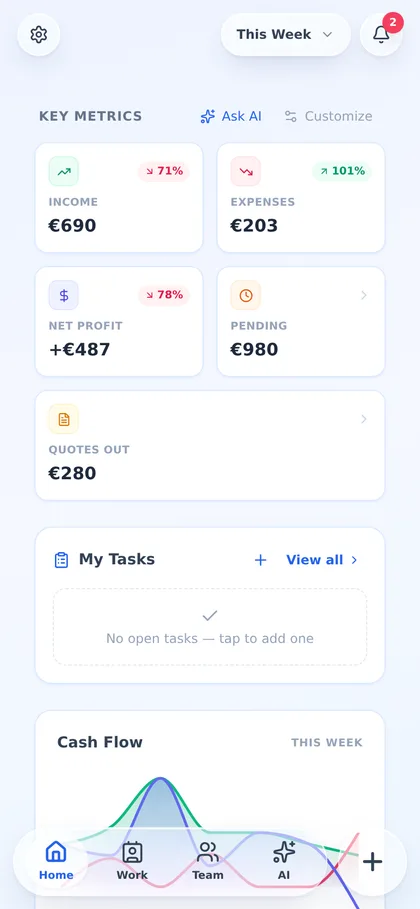
Income and expenses, split by job or general, receipts photographed and attached as you go.
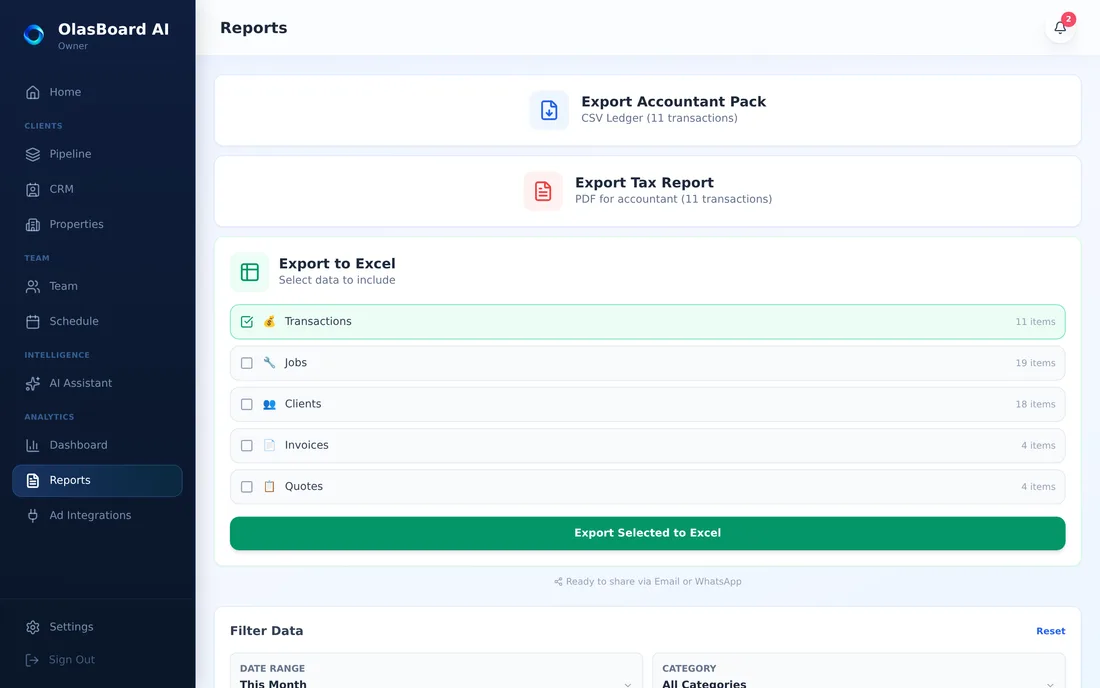
Tax report, profit by job and client, exported to Excel, CSV or PDF at the end of the quarter.
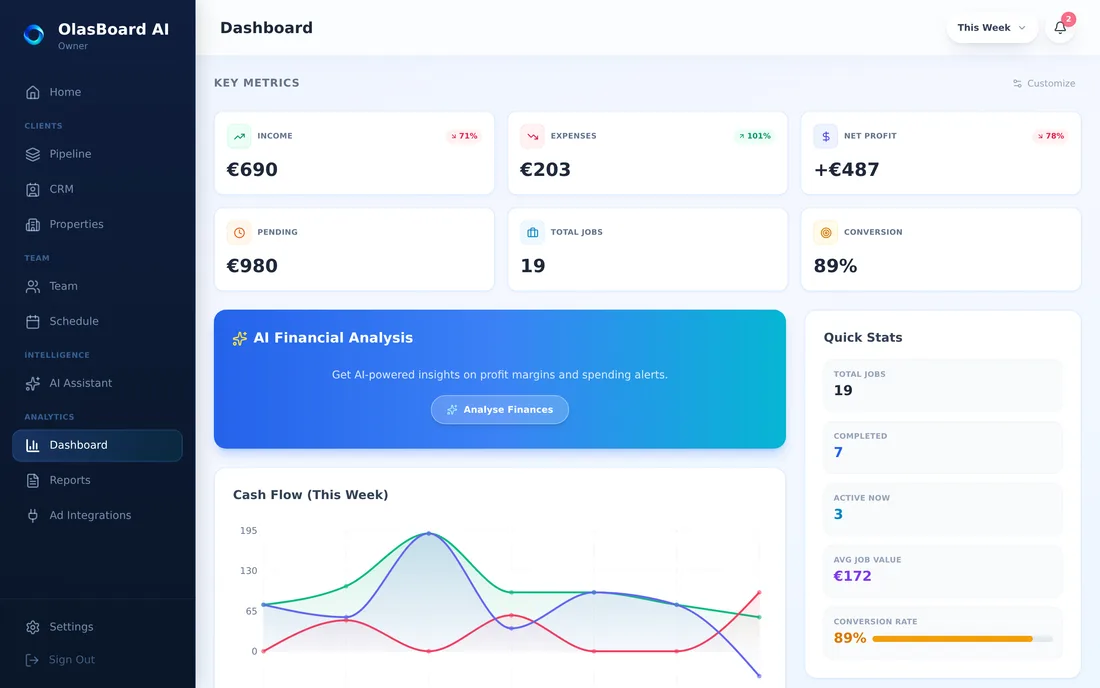
Revenue, expenses and profit by day, week, month or year - so a bad week reads as a bad week, not a crisis.
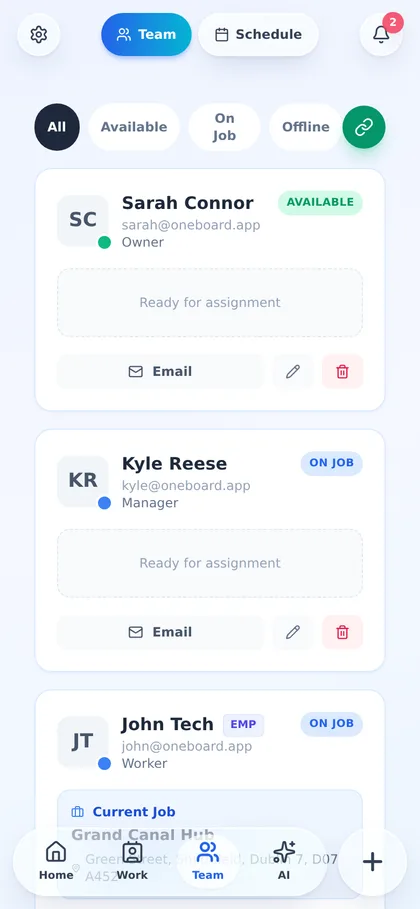
Invite people, set what they can see, and let workers claim jobs, run a timer and upload proof from their own phones.
The parts that save the evenings - all in the app today, on your phone.
Connect your own Stripe account once and every invoice that still owes money carries a pay link - card, Apple Pay or Google Pay. When the client pays, the invoice settles itself and the job moves to Paid.
Your business name, VAT number and rate on every invoice and quote, and your legal name at the foot - "John Smith trading as Apex Cleaning" - on screen and in the PDF.
Tomorrow’s jobs the evening before, each job a couple of hours before it starts, one brief in the morning. Unpaid invoices chased on a schedule on Autopilot and above.
Paste your review link once. A couple of hours after a job is done the app suggests asking that client, with the message written - once per client, never while their invoice is late.
One press tells the client you are on the way and roughly when you will arrive. When the job is finished, the before and after photos go to them as one picture.
It opens with what needs doing - the overdue invoices with reminders written, the enquiries nobody has answered. You read each message and press send; it never sends on its own.
A lead from your website form or your ads gets a reply drafted from your own prices, areas and hours. Send it with a tap, or let the email go by itself.
On the Business plan, up to three businesses under one login - each with its own clients, jobs and invoices, and one overview with the totals of all of them.
Coming soon
Built in, not sold separately
It sees your pipeline, your invoices, your expenses and your crew - and answers the questions a good business partner would.
Ask by typing, by voice, or by photographing a receipt. It can book a job, write a quote or an invoice, record a payment and file a cost — and it waits for your tap before it writes anything. It writes the reminder or the reply to a client, but never sends it - you read each one and press send. It does not delete. Included from the €19 plan, not held back for an enterprise tier.
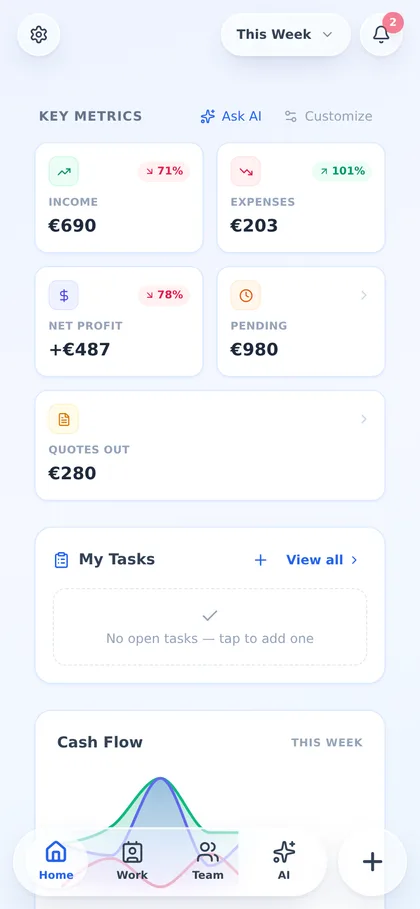
Set your VAT number and rate once and every invoice carries them. Receipts attach to expenses as you go, so the quarter does not end in a shoebox - the tax report exports to Excel, CSV and PDF in the shape your accountant or your MTD-compatible filing software wants.
Built for service businesses working in London, Manchester, Birmingham, Leeds, Glasgow and Bristol - a one-van round or a crew of ten.
Checked against the official sources in October 2026. Rules change - follow the link before you rely on a figure.
Most services, cleaning and trade work included, are at the standard rate of 20%. A few things are at the reduced 5% rate or zero-rated - check before you put anything other than 20% on an invoice.
GOV.UK: VAT ratesRegistration is compulsory once taxable turnover passes £90,000 in any rolling 12 months, or is expected to in the next 30 days alone. Once registered, VAT returns go through Making Tax Digital compatible software.
GOV.UK: when to register for VATSole traders and landlords with qualifying income over £50,000 must use MTD for Income Tax from 6 April 2026, over £30,000 from 6 April 2027, and the government plans over £20,000 from 6 April 2028. Qualifying income is turnover, not profit.
GOV.UK: when to sign up for MTDFrom 1 April 2026 the National Living Wage for workers aged 21 and over is £12.71 an hour, and £10.85 for 18 to 20 year olds.
GOV.UK: minimum wage rates 2026Under the Late Payment of Commercial Debts (Interest) Act 1998 you can claim interest at 8% above the Bank of England base rate, plus £40 for a debt under £1,000, £70 up to £9,999.99 and £100 above that. It applies to business customers, not households.
Small Business CommissionerIn OlasBoard you set your VAT number and default rate once in Settings, and change the rate on any invoice or quote - 20%, 5%, 0% or none if you are not registered. Expenses keep their receipts, and the records export to Excel, CSV or PDF. It is not MTD software: it does not submit to HMRC, so the return goes through your accountant or an MTD-compatible product.
14 days free on Autopilot, no card required. Change plan or cancel any time.
Plans are charged in euro. GBP figures are an approximate guide only - your card issuer sets the rate you actually pay.
Work, instead of doing paperwork
€19/mo
≈ £16 /mo
€16/mo billed yearly
One person
The app does the chasing, not you
€49/mo
≈ £42 /mo
€41/mo billed yearly
Up to 5 people
Keep everyone pointed the right way
€99/mo
≈ £84 /mo
€83/mo billed yearly
Up to 20 people
See where the money leaks
€199/mo
≈ £169 /mo
€166/mo billed yearly
Up to 50 people
On every plan: VAT invoices and quotes, a pay link on each invoice for card, Apple Pay or Google Pay (with your own Stripe account), job reminders, Google review requests, and the AI assistant.
OlasBoard is not an MTD filing bridge and does not submit to HMRC directly. What it does is keep the records that feed the return: VAT-rated invoices, categorised expenses with receipts attached, and a tax report that exports to Excel, CSV and PDF for your accountant or your filing software.
Plans are charged in euro. Sterling figures shown on this page are an indication so you can size the cost - the amount on your statement will be the euro price converted by your card issuer.
Yes. It is built phone-first: quote from the van, photograph a receipt, start and finish a job, and send the invoice before you have driven home.
You can add team members with a Worker role who see only their own jobs, claim work, run a timer and upload before-and-after photos. CIS deductions are not calculated for you - that stays with your accountant.
Yes. There is a spreadsheet import for clients and jobs, so you are not retyping a customer list to get started.
Yes. Connect your own Stripe account once and every unpaid invoice carries a pay link - card, Apple Pay or Google Pay - on the message, on the PDF and in the reminder. When it is paid, the invoice settles itself and the money is in the books.
Yes. Paste your review link once. A couple of hours after a job is done, the app suggests asking that client, with the message already written - once per client, and never while an invoice of theirs is late. You read it and send it yourself.
14 days of the Autopilot plan, free. No card, no call, no setup project - you can have your first quote out this afternoon.
Or try the demo logins first - they run on sample data and never touch a real account.